1
Download
Download the plugin ZIP and extract it to a permanent location on your computer.
Echoes is Advanced Duplicate Finder for Lightroom: a safer way to scan Lightroom Classic metadata, identify probable duplicate and near-duplicate images, suggest keepers, create review-ready logs, and use the unique Selected Photos Against Current Source workflow before you change anything.
Stop guessing which photo to keep.
Echoes identifies probable duplicate and near-duplicate images using transparent Lightroom metadata rules, keeper suggestions, and review-ready collections.
Review first. Clean up later.
Start free with full scans up to 50 photos. Upgrade once for US $14.99 to unlock unlimited scans.
A few examples of the the UI.
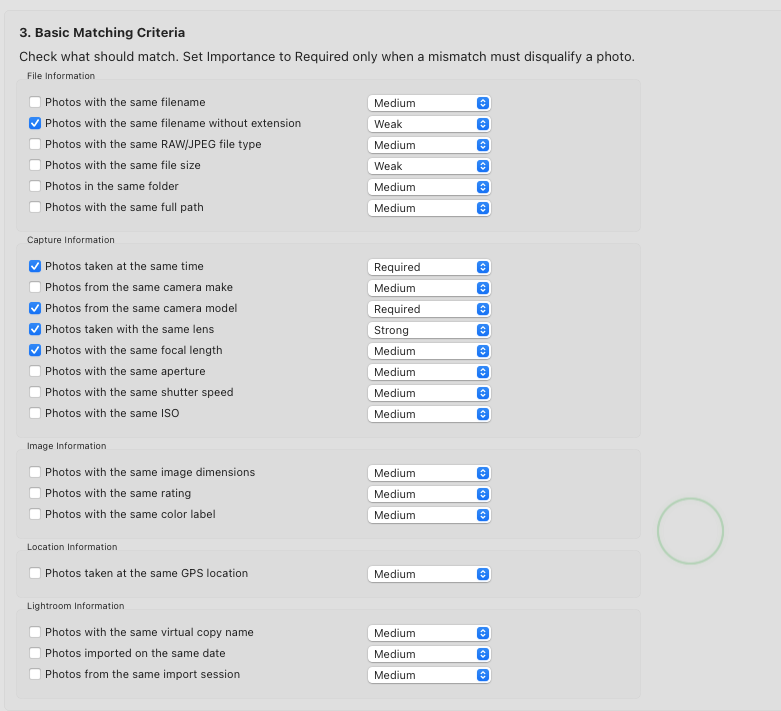
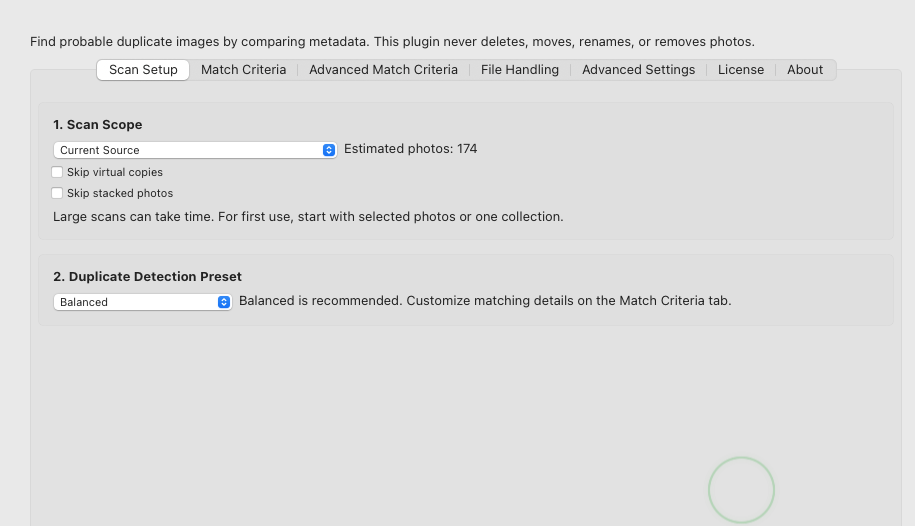
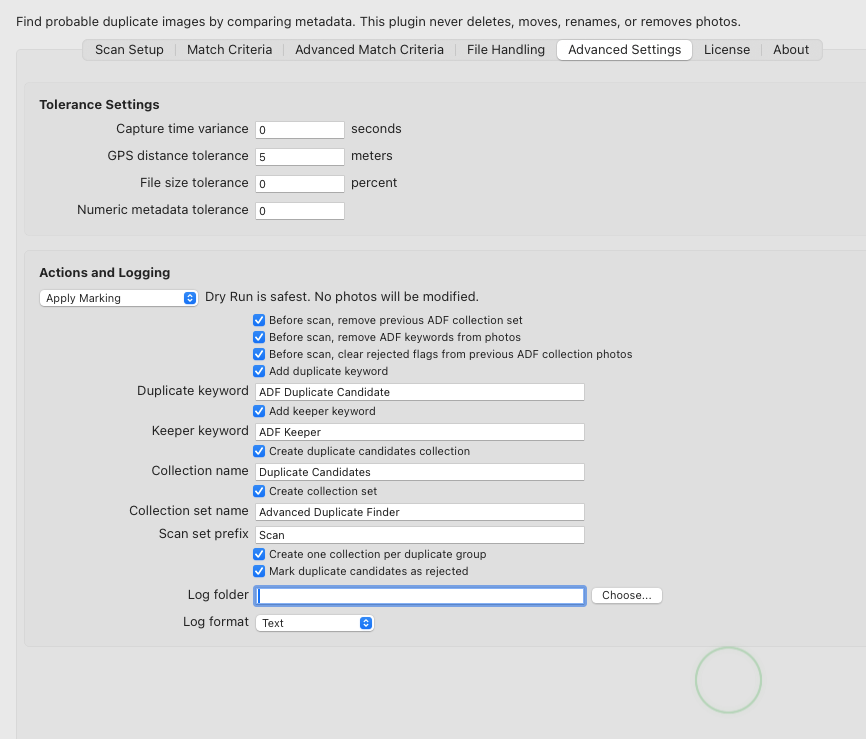
This plugin does not compare pixels and it does not delete anything. It uses configurable metadata rules so you can decide what counts as a duplicate in your workflow.
No deleting, moving, renaming, or removing from the catalog. The plugin helps you identify what deserves review, then leaves the final cleanup decision to you.
Useful when you have RAW files, exported TIFFs, PSD edits, PNGs, JPEG copies, renamed files, protected keywords, virtual copies, stacks, and old folders that no longer follow one clean naming pattern.
Each result is based on visible rules such as capture time, filename, dimensions, file size, GPS, camera data, ratings, labels, and file type.
Run the scan, read the results, and adjust the settings before Lightroom is marked in any way. This is especially useful before larger folder or catalog scans.
Every scan produces CSV files that open in spreadsheet apps, showing scanned photos, duplicate groups, suggested keepers, skipped items, and scan totals.
When you are ready, the plugin can add review keywords, mark duplicate candidates, and build organized collections so you can inspect each group visually.
Lightroom Classic's duplicate detection can be a useful first pass. Echoes is built for photographers who need a review workflow they can tune, audit, and repeat safely across messy catalogs.
Scan selected photos, the active folder, a collection, the current source, the entire catalog, or selected photos against the current source when you only care about a target set.
Decide which metadata matters. Set criteria to Required, Strong, Medium, Weak, or Ignore, then tune capture-time, GPS, file-size, and numeric tolerances.
Every scan can write an image log, audit log, and summary report, so duplicate groups are explainable instead of being a black-box result.
Prefer RAW, camera RAW over DNG, DNG over camera RAW, TIFF/lossless rendered files, higher ratings, larger resolution, edited photos, non-rejected photos, and larger files.
Skip virtual copies, stacked photos, or photos with workflow keywords so intentional edits, grouped bursts, HDR source frames, panoramas, archives, and protected images stay out of the duplicate queue.
When you trust the report, Echoes can add duplicate and keeper keywords, create review collections, create one collection per duplicate group, and optionally mark duplicate candidates as rejected.
Start narrow, inspect the logs, then scale up. The plugin is designed for review and cleanup planning, not blind automation.
Most duplicate workflows scan everything against everything. Echoes can instead treat your selected photos as the target set and search for matches across the current Lightroom source.
Example: import a folder from an old backup, select those newly imported photos, then run Selected Photos Against Current Source to see whether they already exist in the active folder, collection, or source.
Duplicate groups are not always a keep-one decision. Echoes can protect multiple files from larger groups, helping preserve backups, alternate edits, and other valuable versions.
Keep the best two, three, or more files when a single keeper isn't enough.
The plugin is designed to answer practical cleanup questions: which photos look like duplicate candidates, which one should probably be kept, and why that suggestion was made.
Find photos that share meaningful Lightroom metadata, such as capture time, filename patterns, dimensions, file size, GPS location, camera, lens, rating, label, folder, or file type.
Useful for spotting relationships between originals and rendered files, such as RAW plus TIFF, PSD, PNG, or JPEG versions that may have different extensions or slightly changed names.
Keeper suggestions can prefer RAW, lossless rendered files, higher ratings, larger resolution, edited photos, non-rejected photos, and larger file size.
Select specific photos and compare them against the entire current Lightroom source. Useful when you want to check whether newly imported, restored, or migrated images already exist without running a full catalog scan.
Start with Conservative, Balanced, or Aggressive. Then tune how strict the scan should be for time differences, GPS distance, file size differences, and numeric metadata.
After each scan, you get a summary showing photos scanned, duplicate groups found, potential duplicates, keepers suggested, unique photos, skipped photos, and errors.
No complicated setup. If you know how to install a Lightroom plugin, you're already done. If not, follow these three steps.
Download the plugin ZIP and extract it to a permanent location on your computer.
Open Lightroom Classic and go to File → Plug-in Manager. Click Add and select the plugin folder.
Open File → Plug-in Extras → Find Duplicate Images with Echoes... and run your first scan.
The free plan is enough to test the full workflow on a small set of photos. Premium removes the scan limit with a one-time US $14.99 perpetual license.
For testing the plugin on a small selection before trusting it with bigger folders or collections.
For serious Lightroom catalog cleanup across larger folders, collections, current sources, or the entire catalog.
Here are the objections most Lightroom users should resolve before trusting any duplicate workflow.
No. It never deletes files, moves files, renames files, or removes photos from the Lightroom catalog. Cleanup remains your decision.
No. It compares Lightroom metadata such as capture time, filename, dimensions, file size, camera model, GPS, ratings, labels, and optional advanced metadata fields.
Lightroom Classic's built-in duplicate detection can be useful for simple checks. Echoes is for review-heavy cleanup: configurable scan scopes, transparent criteria, keeper rules, skip controls for virtual copies, stacks and keywords, CSV audit logs, and optional Lightroom markings.
The plugin scans and writes reports only. It does not apply keywords, rejected flags, or collections in Lightroom.
This mode treats your selected photos as targets and searches for matching duplicate candidates across the current Lightroom source. It is useful for checking restored folders, new imports, backup recoveries, or migrated images without reporting every duplicate pair in the whole source.
The Free plan processes up to 50 photos fully. Premium is a US $14.99 one-time payment that removes the scan limit and enables the full large-catalog cleanup workflow.
Yes. The audit log explains criteria matches, confidence scores, keeper reasoning, skipped photos, errors, and metadata diagnostics.
After installation, run it from File > Plug-in Extras > Find Duplicate Images with Echoes...
Yes. Purchases are processed through a secure checkout provider. Your payment information is handled by the checkout provider and is not shared with the plugin developer.
We've got you covered. Just click on The Support link in the footer and send us an email. We will respond within 48h!
Start with a small selection, run a dry scan, inspect the logs, then decide whether the paid workflow belongs in your catalog cleanup process.